


Avis Car Rental
4.57.30K Reviews
App Specs
- Version
- 22.27
- Updated On
- License
- Free
- Downloads
- 1,000,000+
- Developer
- Avis Budget Car Rental LLC
- Categories
- Travel & Local
- Platform
- Android, iOS
Screenshots

 Analysis by AppCompare
When I’m planning a trip that depends on having a car, I want to compare the rental details without turning the search into another chore. Avis Car Rental is a travel app from Avis Budget Car Rental LLC, and its focus is practical: finding a rental, keeping track of a booking, and handling the details around pickup and return. I see its strongest appeal in trips where Avis is already a realistic choice, rather than as a universal answer to every transport need.
What the free download does—and does not—tell you
The app is free to download, which makes it easy to try before a trip. That is different from saying that a rental itself is free: the cost of a vehicle depends on the reservation you make, and I would check the final booking details before deciding whether the overall trip fits my budget. I like that distinction because the app’s price is only one part of the spending decision.
For a traveler comparing options, the useful question is not simply whether the app costs anything to install. It is whether Avis has a suitable vehicle at the location and time you need, and whether the terms shown for that specific reservation work for you. I would compare the complete booking details with other rental choices rather than treating a quick search result as the whole cost.
Where the app earns a place in trip planning
Car rental belongs to a different part of travel planning than transit directions or hotel searches: you are arranging access to a vehicle, not just finding a route. The app is most useful when a car will solve a real gap in the itinerary, such as getting between places that are inconvenient to reach by public transport or carrying luggage for a journey beyond a city center.
A realistic example is a traveler arriving at an airport for a visit that includes both a city stay and destinations outside it. I would use the app to check whether an Avis pickup suits the arrival plan, compare the available vehicle choices, and keep the reservation details handy for later. If the itinerary changes, being able to revisit a booking in an app can be more convenient than searching through old messages, though I would still check the reservation carefully before relying on a change.
The same approach works for a local rental. If my own car is unavailable for a day, I can look for a vehicle around the dates I need instead of building the entire day around rides from other people. The app makes most sense when I already know roughly where and when I need a car; it is less compelling if I am only browsing without a clear trip or comparing transport modes from scratch.
How I would compare it with alternatives
Compared with a general travel-planning app, Avis Car Rental has a narrower job: it is centered on Avis rentals rather than serving as a broad, all-provider comparison tool. That focus can be helpful when I want to manage an Avis reservation in one place. It can also limit the comparison, since a single-rental-company app is not the same thing as checking several rental brands side by side.
Worth Reading Before You Choose

EA SPORTS FC Mobile 26 Is a Bigger Football Game, but It Takes Time

Flipboard Shows What News Apps Must Do Beyond the Feed

Switching to Android Auto Means Rethinking Your Driving Routine

Google Calendar Makes a Crowded Week Easier to Manage

Ludo King Makes the Most of the Minutes Between Plans

Baby Panda World Brings Quick Play to Modern Phones, but Its Game Library Feels Busy
I would use it alongside, not instead of, the wider planning tools that answer different questions. A map or transit app can help me decide whether I need a car at all; a rental comparison service may help when I want to weigh multiple providers; and the Avis app is the natural place to look when I am considering or managing an Avis booking. The best choice depends on the task, not on which app has the broadest set of travel functions.
One practical tip is to settle the pickup and return plan before comparing vehicles. Airport and local rentals can serve different itineraries, and the location that looks convenient on a map may not be the one that works best with a flight, hotel, or day’s schedule. I would also compare the times as carefully as the dates: a reservation that starts or ends at the wrong point in the day can disrupt the plan even when the locations are right.
Using Avis Car Rental from search to return
As a travel and local app, it is aimed at people arranging vehicle rentals rather than travelers looking for general destination inspiration. Avis Car Rental has a 4.5 average from around 38,000 ratings, and more than a million installs. Those figures suggest that it is a familiar option for many travelers, but I would still judge it by whether its booking flow and available choices fit my own trip.
The app is free, is rated for everyone, and its current version is 22.19. It has been available since March 12, 2012, and supports Android 7.0 and later. Those details make it a longstanding option for compatible devices, while the specific availability and terms that matter to a trip still depend on the reservation being considered.
Getting Started
First things first, diving into the Avis Car Rental app is like stepping into a well-organized rental desk, but without the long lines and paperwork. Available on both Android and iOS, the app is free to download, and setting up your account is a breeze. You’ll need to enter some personal details, but it’s nothing too invasive, just the usual stuff you’d expect.
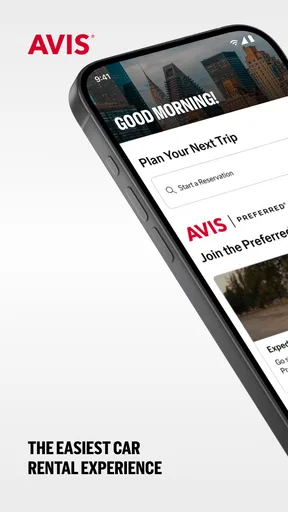
Once you’re all set up, the home screen greets you with a clean interface, which is a huge plus. No clutter, just straightforward options to book, view, or manage your rentals. If you’re like me and appreciate simplicity, this is a big win.
Booking Your Ride
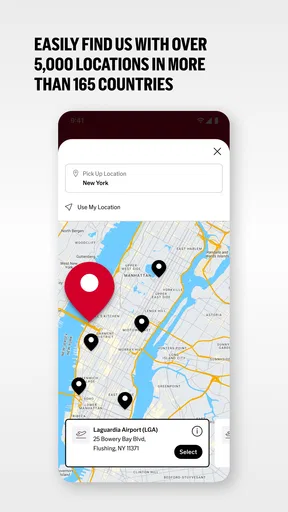
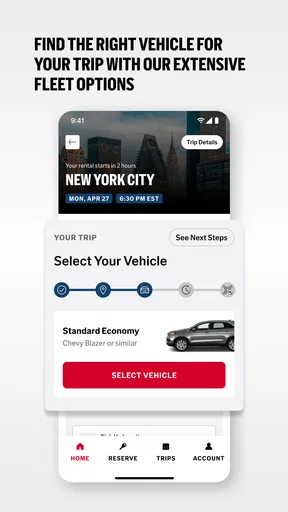
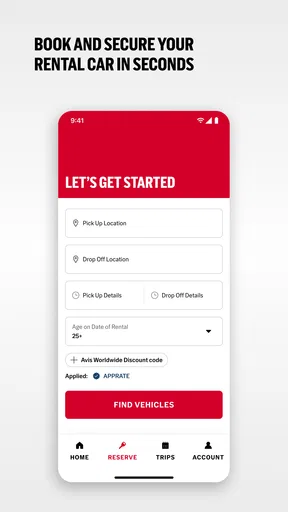
Let’s talk about the booking process because, honestly, the Avis Car Rental app makes the process feel direct. You start by entering your pickup and drop-off locations, dates, and times. The app then displays a neat list of available vehicles, from economy wheels to luxury rides. Each car comes with a detailed description, including the number of seats, luggage capacity, and even fuel options. It’s like having your own personal car showroom right on your phone.
One feature I absolutely love is the ability to filter results. Whether you need a specific type of car or a particular price range, the app’s got you covered. Plus, you can save your preferred car type for future bookings, making the process even faster next time.
My practical advice is to treat those filters as a way to narrow the field, not as a substitute for checking the full reservation. A car that looks right by class may still be a poor fit if its space or fuel details do not match the way I plan to travel. For a family trip, I would think through passengers and luggage together; for a solo work journey, a smaller choice may be easier to handle. That quick check helps prevent choosing based on a label alone.
The Extras You’ll Love
Beyond just booking, the app offers several handy extras. Ever been in a situation where you need to change your booking last minute? With this app, you can modify your reservation on the go without a hitch. Lost your way? The integrated GPS helps you find your rental location or drop-off point with ease.
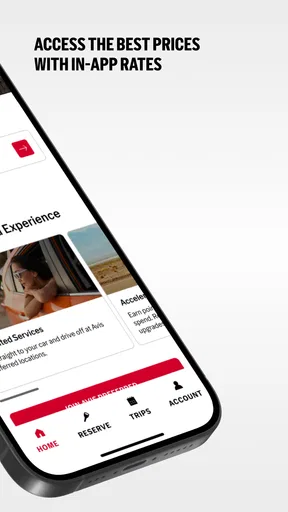
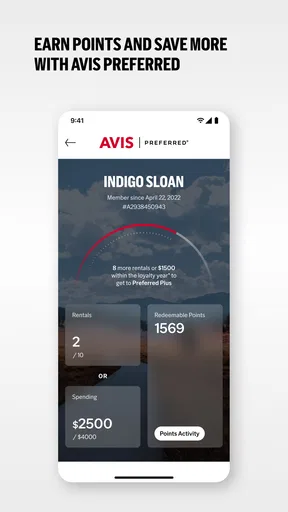
There’s also an option to join Avis Preferred, their loyalty program, directly through the app. This is perfect if you’re a frequent traveler and want to rack up points for discounts and upgrades. Trust me, every point counts when you’re saving up for that dream convertible!
I would weigh the loyalty option against how often I actually rent with Avis. If I use the company repeatedly, having the program accessible in the same place as bookings may make it easier to keep track of. If I rent only occasionally or usually choose whichever provider best fits each trip, I would not let a loyalty scheme decide the booking on its own. Convenience and a suitable reservation matter first; any possible loyalty value is a secondary consideration.
Managing Your Rentals
The app’s management features are a lifesaver. You can view all your current and past bookings in one place. Need a receipt for your last trip? No problem, just download it straight from the app. This is particularly useful for business travelers who need to keep track of expenses effortlessly.
I also appreciate the app’s notifications. It sends timely reminders about your upcoming rental and alerts you if there’s a change in your booking. No more last-minute surprises!
For work travel, I would make a habit of saving the receipt after the rental rather than waiting until expense paperwork is due. Keeping the booking and receipt together can reduce the small but annoying task of reconstructing a trip later. Notifications are useful as prompts, too, but I would still open the reservation and verify the important details before setting off; an alert is a reminder, not a replacement for checking the plan.
When another choice makes more sense
There are clear cases where I would skip this app. If I do not need a car, a rental booking app adds an unnecessary step to the trip. If my main priority is comparing several rental companies at once, I would start with a service designed for broad comparison and use Avis’s app if I decide to book with Avis. And if the pickup location or available choice does not suit the itinerary, loyalty or app convenience alone would not make that reservation the right one.
There is also a difference between handling a reservation in an app and resolving every possible travel problem there. I find app-based management useful for straightforward changes and keeping details accessible, but for a complicated booking issue I would not assume that a screen is always the fastest route to an answer. Keeping reservation information available and allowing time to deal with a change are sensible habits, especially when travel plans are tight.
Ending Thoughts
In conclusion, if you’re in the market for a reliable, efficient, and user-friendly car rental app, the Avis Car Rental app should be high on your list. It simplifies the entire rental process, from booking to returning your vehicle, ensuring a hassle-free experience. Whether you’re planning a long road trip or a quick weekend getaway, this app keeps you covered. So why not give it a spin and see how it transforms your travel plans? You’ll be cruising through your next adventure with ease.
My recommendation is more specific: I would try it when Avis is already among the providers I am considering and I want a direct way to search for and manage that rental. Its free download lowers the barrier to checking, while the actual value comes down to the vehicle, pickup plan, and reservation terms that suit the journey. I would choose another option when I need a wider provider comparison or when public transport, a taxi, or another way of getting around is simply more practical. For an Avis-focused rental, though, the app is a useful place to keep the process organized.
Pros
- User-friendly interface for quick bookings.
- Wide variety of car options available.
- Easy-to-use filter and search functions.
- Flexible cancellation policies.
- 24/7 customer support via chat.
Cons
- Occasional app crashes reported.
- Limited loyalty program benefits.
- High fees for underage drivers.
- Some features require stable internet.
- Not all locations offer one-way rentals.
FAQs for Avis Car Rental
What features does the Avis Car Rental app offer?
The Avis Car Rental app provides several features designed to enhance your car rental experience. It allows you to easily reserve a vehicle, modify or cancel reservations, and access exclusive deals and offers. The app also includes a GPS feature for navigation and a loyalty program tracker for Avis Preferred members.
Is the Avis Car Rental app available on both Android and iOS?
Yes, the Avis Car Rental app is available for both Android and iOS devices. You can download it from the Google Play Store for Android and the Apple App Store for iOS. It’s designed to offer a seamless experience across different platforms, ensuring all users have access to its features.
Can I manage my rentals directly through the Avis app?
Absolutely. The Avis app allows you to manage all aspects of your rental. You can book a car, modify your reservation, upgrade your vehicle, and even return your car without any hassle. The app also offers real-time notifications about your rental status, making it incredibly convenient for travelers.
How does the loyalty program work within the Avis app?
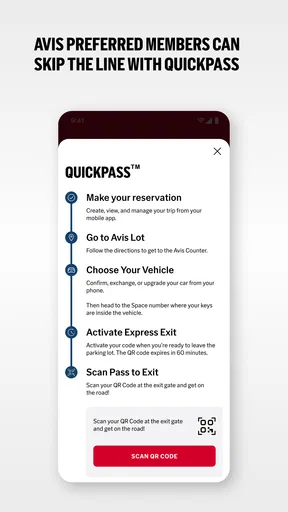
The Avis Preferred loyalty program is integrated into the app, allowing members to track their points and status easily. As a member, you can earn rewards with each rental, enjoy expedited service, and access exclusive offers. The app simplifies the process of redeeming rewards and keeping tabs on your membership benefits.
Are there any special deals or discounts available through the Avis app?
Yes, the Avis app frequently offers exclusive deals and discounts to its users. These can include discounted rates, free upgrades, and special promotions. By enabling notifications, you can stay updated on the latest offers and save money on your car rentals. It’s a great way to maximize value for frequent renters.


